Popular on EntSun
- Houston Teen Country Duo Maddy & Colton to Perform on Main Stage at 2026 FIFA World Cup Houston Fan Festival - 182
- Bay Street Yard to host FIFA World Cup watch parties - 177
- Summer Sip Returns July 19 with 10 Hudson Valley Wineries, Live Music, Food and New Grand Reserve Experience - 170
- TREND Network Announces Miami Based Reality Series "Coming Up Miami" Premiering July 1 - 168
- Slipaway Food Truck Park & Marina to host Fourth of July Bash - 138
- Brilliant Minds to Gather in Fort Worth for National Mensa Event - 130
- UK Financial Ltd Completes One Of The Most Extensive CoinMarketCap Supply Verification Packages For Maya Preferred PRA (MPRA) - 128
- Comedy Musical Shangri-La-La Takes Siegfried & Roy, Vegas Magic, and Tiger-Sized Trouble on the Fringe Festival Road - 126
- Sexually Abused in a Psychiatric Hospital or Psychiatrist's or Psychologist's Office? CCHR Urges Survivors to Reach Out to It - 125
- Vertex Micro Fest Makes History, And Partners With You42 Studios In Georgia - 125
Similar on EntSun
- AutomationIQ Launches to Bring Enterprise-Grade AI Automation to Local and Mid-Market Businesses
- Blues Music Award Nod for Brian Walton's "What the Hell!"
- Delirious Comedy Club Transforms Into Las Vegas' Newest Live Comedy Studio With Weekly Delirious TV Tapings
- BitTitan Advances MigrationWiz with New Capabilities, Platform Enhancements, and Product Leadership Update
- Soapkast Launches Thrice Weekly Audio Soap Opera "worlds Apart"
- Submissions Now Being Accepted for 2027 WinterWorks New Play Festival
- Rhythm & Purpose Collective, LLC Launches New Annual Dinner Concert in Fredericksburg
- Classic Picture Cars Ignites Period Perfection with Professional Era Picture Cars
- Movie Car Registry Connects America's Car Enthusiasts with the Entertainment Industry
- Slipaway Food Truck Park & Marina to launch 'Makers Monday' event series
Colorfront Launches New Mac App For Creating Apple Immersive Video
EntSun News/11089761
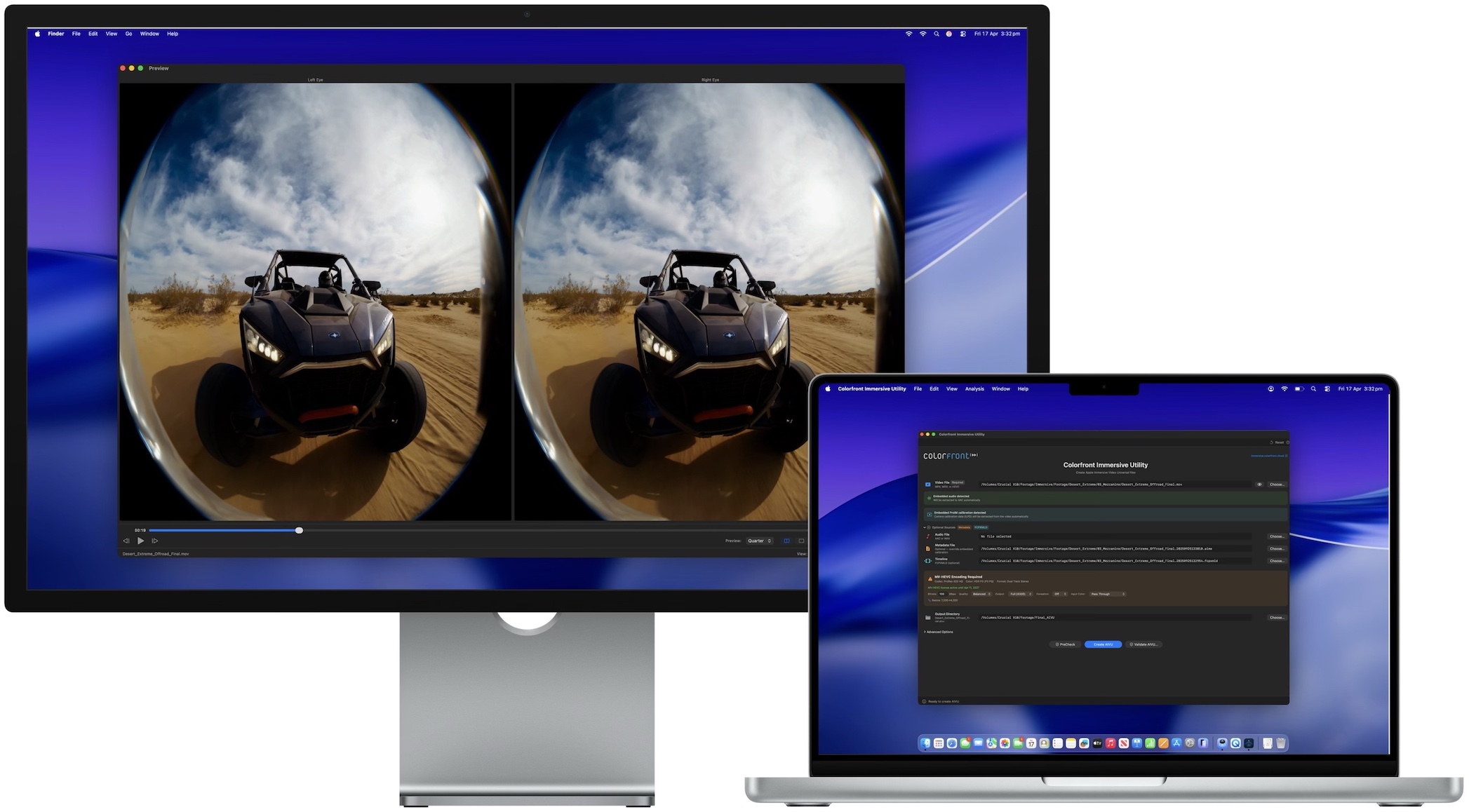
New macOS app converts high-res video and Spatial Audio into Apple Immersive Video (.aivu) files for Apple Vision Pro
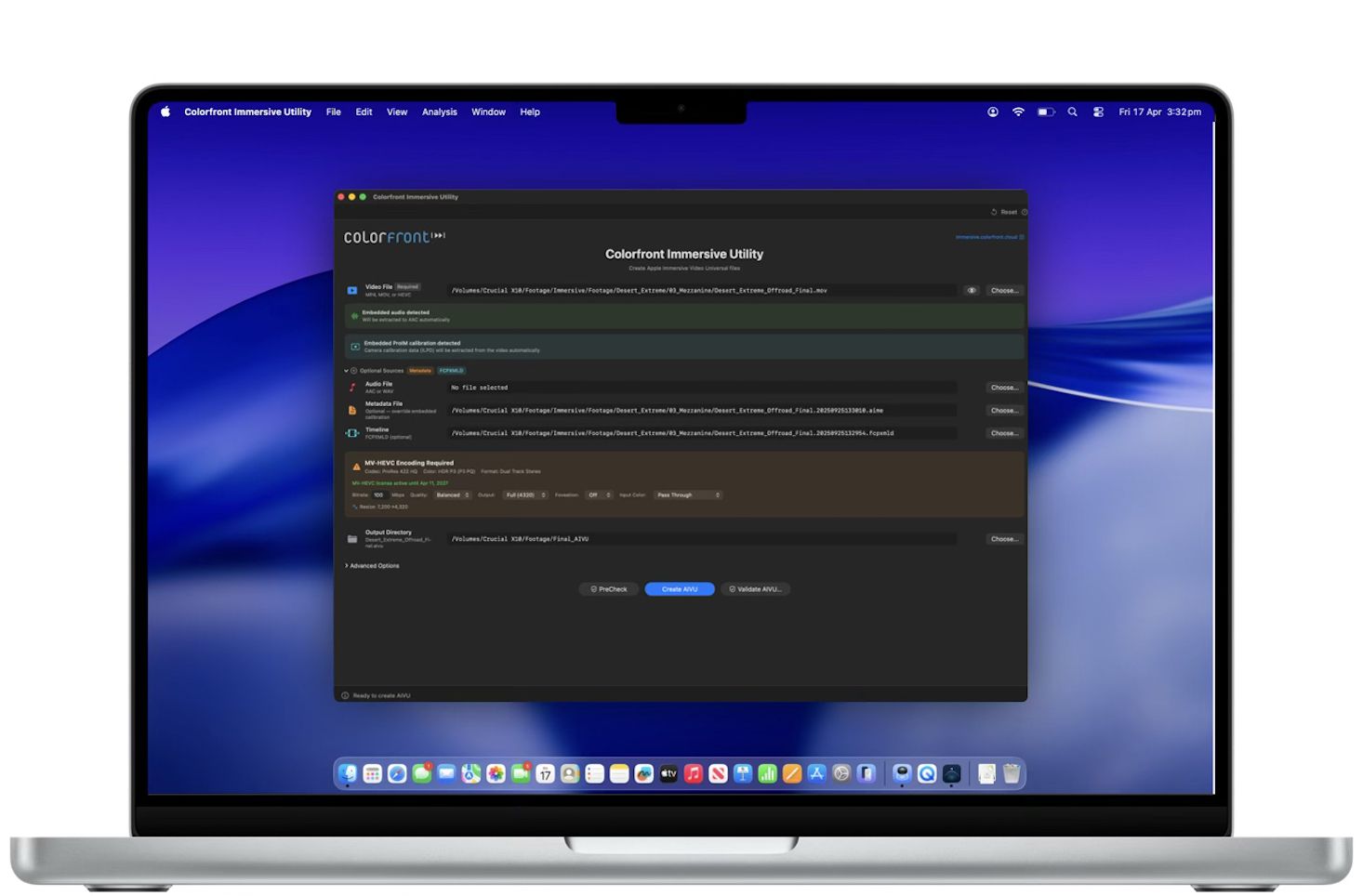
LOS ANGELES - EntSun -- Colorfront today announced Colorfront Immersive Utility, a new macOS app that creates Apple Immersive Video files (.aivu) for playback on Apple Vision Pro. The app accepts video in ProRes, MV-HEVC, and other standard formats, pairs it with Spatial Audio and camera metadata, and outputs a single AIVU file ready for distribution.
Colorfront Immersive Utility streamlines the process for preparing immersive video content for Apple Vision Pro with a single app. Users select a video file, a metadata file containing camera intrinsics, and an output directory. The app can also auto-detect ILPD calibration data embedded directly in the source video, so a separate metadata file isn't always required. From there, users simply click Create AIVU, and the app handles encoding, audio extraction, and packaging automatically.
"We built Colorfront Immersive Utility to put immersive video production into the hands of every type of creative, whether you're a filmmaker, a documentarian, or a brand telling a story in a completely new medium," said Mark Jaszberenyi, Co-Founder of Colorfront. "Apple Vision Pro has opened up an incredible storytelling canvas, and we wanted to expand access to these tools to as many creatives as possible. The entire pipeline runs on Mac devices with Apple silicon using Metal, so users can go from camera originals to a finished Apple Immersive Video experience."
GPU-accelerated MV-HEVC encoding
When the source video is ProRes or another non-HEVC format, Colorfront Immersive Utility encodes it to MV-HEVC using a GPU-accelerated Metal pipeline. Users can set the bitrate anywhere from 0 to 150 Mbps, choose from six quality/performance presets, and output at full 4320p (4320 x 4320 per eye) or half 2160p resolution. A Lanczos-3 resampling filter handles any resolution conversion needed.
Foveation is built into the same GPU pass. It allocates more resolution to the center of the frame, where the viewer typically looks, while gradually reducing resolution toward the edges. Three levels are available (1.25x, 1.5x, and 2.0x center magnification), and because foveation is integrated directly into the Lanczos resampling filter, there is no additional quality loss from a second processing step.
More on EntSun News
Color space conversion is automatic. The app reads the video's embedded color metadata (NCLC/CICP tags) and converts to P3 D65 PQ at 108 nits, the target color space for Apple Immersive Video. Manual overrides are available for SDR BT.709, HDR10 BT.2020, and other source formats. The entire encoding pipeline processes video at 10-bit precision.
Spatial audio with APAC conversion
Colorfront Immersive Utility automatically detects and extracts embedded audio tracks from the source video to AAC. When a separate WAV file is provided instead, the app converts it to Apple Positional Audio Codec (APAC) for spatial playback on Apple Vision Pro. Three APAC bitrate tiers are available: 384 kbps, 512 kbps (default), and 768 kbps. A configurable fade-in (0 to 60 seconds) can be applied at the beginning of the file.
Multi-shot AIVU with Final Cut Pro XML timelines
The app supports multi-shot AIVU files through Final Cut Pro XML timeline import. Each shot in the timeline references a camera ID, start time, and duration. During AIVU creation, shot boundaries are encoded as setCamera presentation commands in the output file, so Apple Vision Pro can switch between camera perspectives automatically during playback.
Source PreCheck
Before starting any encode, users can run Source PreCheck, a pre-flight validation tool that analyzes video, audio, metadata, and timeline files for potential issues without beginning the creation process. PreCheck grades results by severity: errors that block AIVU creation, warnings worth reviewing, and informational notes. Results are grouped by category (Video, Audio, Metadata, Compatibility). Source PreCheck is available without a license.
Result validation and light level analysis
After an AIVU file is created, the app can validate it with a GPU-accelerated light level analysis that measures MaxCLL, MaxFALL, AvgFALL, and other metrics on every frame of the video. For stereo MV-HEVC content, left and right eye layers are analyzed independently. The validation flags frames that exceed the 108-nit maximum brightness of the Apple Vision Pro display. A parallel analysis mode splits the file in two halves and analyzes them concurrently for roughly 2x faster processing.
More on EntSun News
Validation results can be exported as a multi-page PDF report with light level graphs, shot lists with thumbnails, and the brightest frames from the video. Additional analysis tools include PSNR/SSIM quality metrics for comparing source and encoded files, with per-eye breakdown and overlay charts for stereo content. The app also integrates with Apple Video Quality Tool (AVQT) for no-reference quality scoring of the main eye when AVQT is installed.
Real-time GPU preview
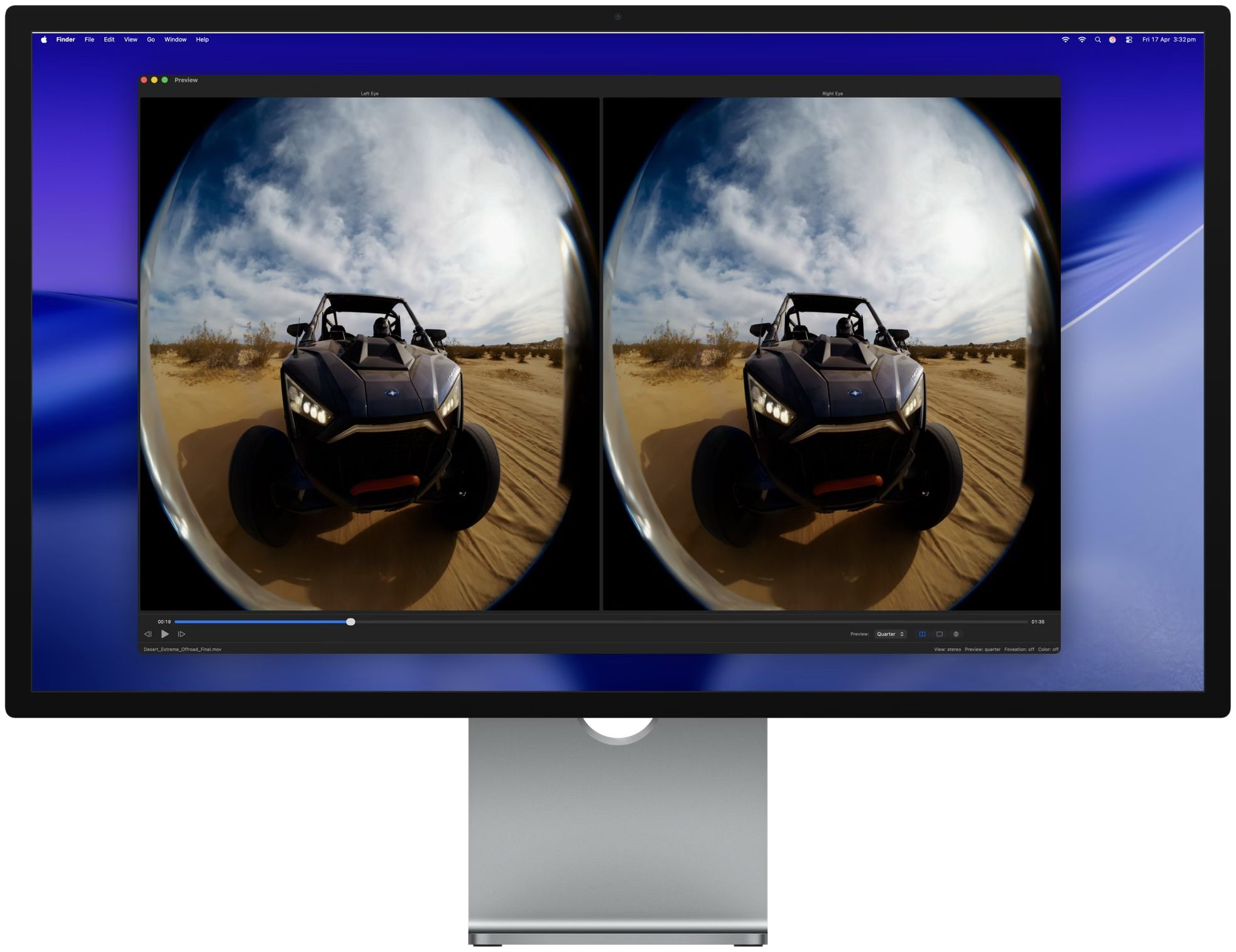
A built-in preview window provides real-time GPU-accelerated playback of the processed video. The preview is synchronized with the main window settings, so changes to foveation level, color space, or other parameters are reflected immediately. View modes include stereo (dual eye), single eye (left or right), and an immersive perspective view. Preview quality can be set to full, half, or quarter resolution.
Pricing and availability
Colorfront Immersive Utility is available today on the Mac App Store. It requires macOS 26.0 (Tahoe) or later, a Mac with Apple silicon (M1 or later required), and at least 16 GB of RAM (32 GB or more recommended for 8K content).
The free tier includes file import and inspection, stereo format and codec detection, real-time preview, MV-HEVC passthrough packaging (no encoding), and Source PreCheck. The MV-HEVC License is a one-year non-renewing subscription at $299 USD. It unlocks GPU-accelerated encoding from ProRes and other non-HEVC formats, result validation with light level analysis, PSNR/SSIM and AVQT quality metrics, and PDF report generation. The license is verified through the App Store and supports Restore Purchases.
For more information, visit immersive.colorfront.cloud.
Link to Colorfront Immersive Utility on Mac App Store
https://apps.apple.com/us/app/colorfront-immersive-utility/id6758009531?mt=12
About Colorfront
Colorfront develops color science and post-production software used by studios and content creators worldwide. The company was founded in Budapest, Hungary. More information is available at www.colorfront.com.
Colorfront Immersive Utility streamlines the process for preparing immersive video content for Apple Vision Pro with a single app. Users select a video file, a metadata file containing camera intrinsics, and an output directory. The app can also auto-detect ILPD calibration data embedded directly in the source video, so a separate metadata file isn't always required. From there, users simply click Create AIVU, and the app handles encoding, audio extraction, and packaging automatically.
"We built Colorfront Immersive Utility to put immersive video production into the hands of every type of creative, whether you're a filmmaker, a documentarian, or a brand telling a story in a completely new medium," said Mark Jaszberenyi, Co-Founder of Colorfront. "Apple Vision Pro has opened up an incredible storytelling canvas, and we wanted to expand access to these tools to as many creatives as possible. The entire pipeline runs on Mac devices with Apple silicon using Metal, so users can go from camera originals to a finished Apple Immersive Video experience."
GPU-accelerated MV-HEVC encoding
When the source video is ProRes or another non-HEVC format, Colorfront Immersive Utility encodes it to MV-HEVC using a GPU-accelerated Metal pipeline. Users can set the bitrate anywhere from 0 to 150 Mbps, choose from six quality/performance presets, and output at full 4320p (4320 x 4320 per eye) or half 2160p resolution. A Lanczos-3 resampling filter handles any resolution conversion needed.
Foveation is built into the same GPU pass. It allocates more resolution to the center of the frame, where the viewer typically looks, while gradually reducing resolution toward the edges. Three levels are available (1.25x, 1.5x, and 2.0x center magnification), and because foveation is integrated directly into the Lanczos resampling filter, there is no additional quality loss from a second processing step.
More on EntSun News
- J&J Exterminating Mourns the Passing of Founder Bobby John Sr
- Delirious Comedy Club Transforms Into Las Vegas' Newest Live Comedy Studio With Weekly Delirious TV Tapings
- BitTitan Advances MigrationWiz with New Capabilities, Platform Enhancements, and Product Leadership Update
- Sara Abbas Receives "Eniochos" Charioteer Award at 2026 Who is Who International Awards
- Detained at 95: South Korea's Prosecution of a Religious Leader Draws International Alarm
Color space conversion is automatic. The app reads the video's embedded color metadata (NCLC/CICP tags) and converts to P3 D65 PQ at 108 nits, the target color space for Apple Immersive Video. Manual overrides are available for SDR BT.709, HDR10 BT.2020, and other source formats. The entire encoding pipeline processes video at 10-bit precision.
Spatial audio with APAC conversion
Colorfront Immersive Utility automatically detects and extracts embedded audio tracks from the source video to AAC. When a separate WAV file is provided instead, the app converts it to Apple Positional Audio Codec (APAC) for spatial playback on Apple Vision Pro. Three APAC bitrate tiers are available: 384 kbps, 512 kbps (default), and 768 kbps. A configurable fade-in (0 to 60 seconds) can be applied at the beginning of the file.
Multi-shot AIVU with Final Cut Pro XML timelines
The app supports multi-shot AIVU files through Final Cut Pro XML timeline import. Each shot in the timeline references a camera ID, start time, and duration. During AIVU creation, shot boundaries are encoded as setCamera presentation commands in the output file, so Apple Vision Pro can switch between camera perspectives automatically during playback.
Source PreCheck
Before starting any encode, users can run Source PreCheck, a pre-flight validation tool that analyzes video, audio, metadata, and timeline files for potential issues without beginning the creation process. PreCheck grades results by severity: errors that block AIVU creation, warnings worth reviewing, and informational notes. Results are grouped by category (Video, Audio, Metadata, Compatibility). Source PreCheck is available without a license.
Result validation and light level analysis
After an AIVU file is created, the app can validate it with a GPU-accelerated light level analysis that measures MaxCLL, MaxFALL, AvgFALL, and other metrics on every frame of the video. For stereo MV-HEVC content, left and right eye layers are analyzed independently. The validation flags frames that exceed the 108-nit maximum brightness of the Apple Vision Pro display. A parallel analysis mode splits the file in two halves and analyzes them concurrently for roughly 2x faster processing.
More on EntSun News
- Soapkast Launches Thrice Weekly Audio Soap Opera "worlds Apart"
- Submissions Now Being Accepted for 2027 WinterWorks New Play Festival
- CCHR: DOJ Takedown Exposes Over $220 Million Defrauded in Behavioral Mental Health Fraud Schemes
- Rhythm & Purpose Collective, LLC Launches New Annual Dinner Concert in Fredericksburg
- Lady Liberty Is Coming Home: Historic WWII A-26 Invader Begins Her Final Journey to the Tulsa Air & Space Museum
Validation results can be exported as a multi-page PDF report with light level graphs, shot lists with thumbnails, and the brightest frames from the video. Additional analysis tools include PSNR/SSIM quality metrics for comparing source and encoded files, with per-eye breakdown and overlay charts for stereo content. The app also integrates with Apple Video Quality Tool (AVQT) for no-reference quality scoring of the main eye when AVQT is installed.
Real-time GPU preview
A built-in preview window provides real-time GPU-accelerated playback of the processed video. The preview is synchronized with the main window settings, so changes to foveation level, color space, or other parameters are reflected immediately. View modes include stereo (dual eye), single eye (left or right), and an immersive perspective view. Preview quality can be set to full, half, or quarter resolution.
Pricing and availability
Colorfront Immersive Utility is available today on the Mac App Store. It requires macOS 26.0 (Tahoe) or later, a Mac with Apple silicon (M1 or later required), and at least 16 GB of RAM (32 GB or more recommended for 8K content).
The free tier includes file import and inspection, stereo format and codec detection, real-time preview, MV-HEVC passthrough packaging (no encoding), and Source PreCheck. The MV-HEVC License is a one-year non-renewing subscription at $299 USD. It unlocks GPU-accelerated encoding from ProRes and other non-HEVC formats, result validation with light level analysis, PSNR/SSIM and AVQT quality metrics, and PDF report generation. The license is verified through the App Store and supports Restore Purchases.
For more information, visit immersive.colorfront.cloud.
Link to Colorfront Immersive Utility on Mac App Store
https://apps.apple.com/us/app/colorfront-immersive-utility/id6758009531?mt=12
About Colorfront
Colorfront develops color science and post-production software used by studios and content creators worldwide. The company was founded in Budapest, Hungary. More information is available at www.colorfront.com.
Source: Colorfront
Filed Under: Entertainment, Film
0 Comments
Latest on EntSun News
- The Winter's Tale at Theatre School @ North Coast Rep
- Scapin at North Coast Repertory Theatre
- Sterling Style Academy Elevates Color Analysis Training and Stylist Certifications with Focus on Transparency
- Kasinohai Audit: Most Slots Could Be Affected by Finland's Draft Gambling Rules
- Why More Phoenix Families Are Turning to Private Autopsy Services for Answers
- MetroLagoons to debut Lagoon Lager in partnership with Florida Avenue Brewing Co
- Two 360 Sound And Vision Vinyl LPs Named Among Discogs' Most Expensive Records Sold
- Industry Leaders Salute Caviar and Keith D. Robinson at BeTrue Studios BET Weekend Event
- As AI Reshapes Hollywood, Studio Valdivieso Doubles Down on Human Storytelling
- Make America French Again Launches National Campaign
- RAS AP Consulting Expands AP Governance & Automation Practice and Named Finalist for Heidelberg Materials SAP Vendor & Customer Data Project
- Shangri-La-La Brings a Vegas-Sized Siegfried & Roy Musical Comedy to the 2026 Festival Circuit
- 5th Annual Juneteenth Fashion Show Returned to Legacy West Celebrating Unity and Culture
- TV and Film Cars Strengthens Support for Car Brand Filming Companies and Productions
- Prefontaine Classic features a spectacular drone light show
- Warm Springs community drone show
- New York Picture Cars Powers Authentic Vehicle Solutions for Empire State Productions
- July 4th patriotic Drone Light Show for community
- Sterling Style Academy Announces Standalone Online Color Analysis Training Utilizing Proprietary Three-Dimensional Evaluation Method
- PoLo Jose's Powerful Drama Dissection of the Dollar Now Streaming on Tubi